



HP Prodesk 600 G1 DM Review
I bought this mini pc a while ago from eBay for about £40, and I've been using it as my main PC for the last month. Overall its been really good, especially the low power consumption which keeps the temperature down in the room.
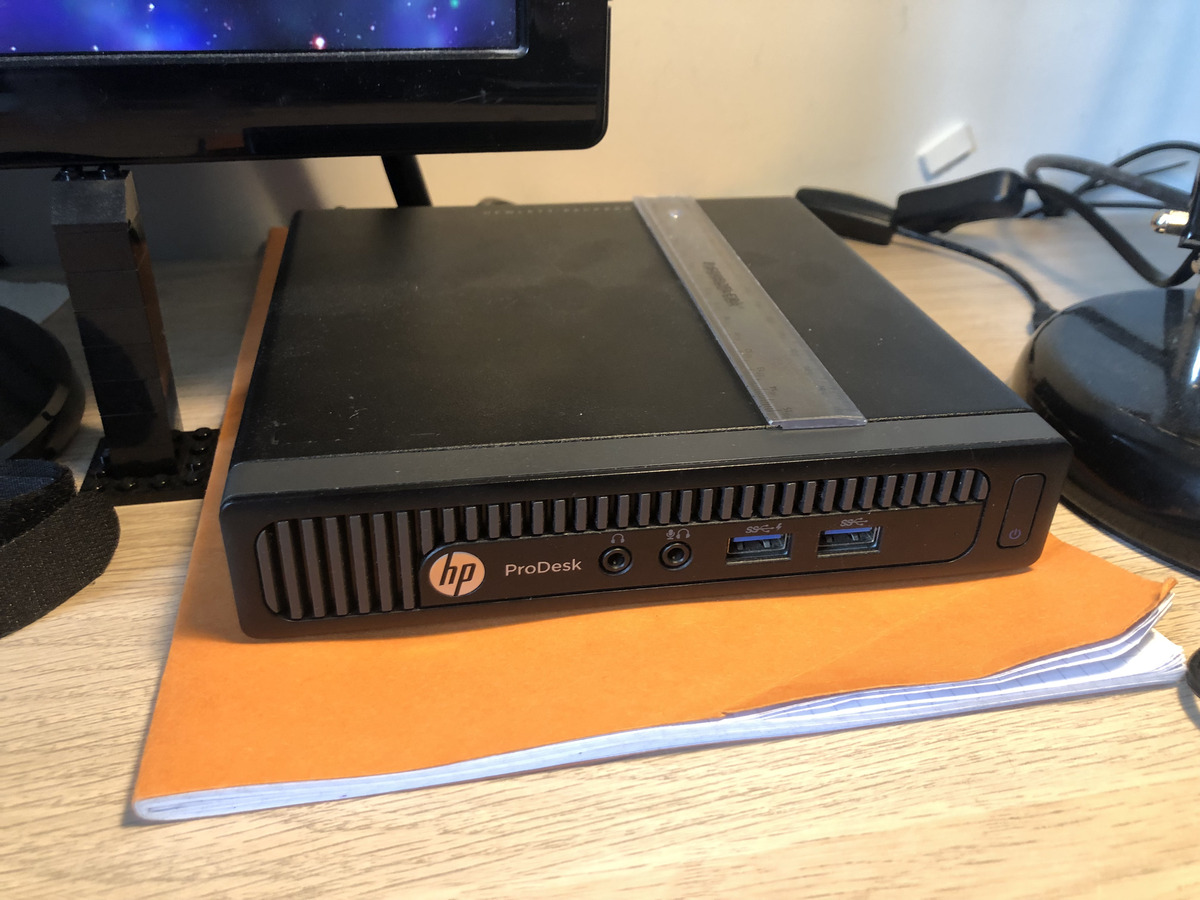
Picture of the PC, 15cm ruler for scale
Specs
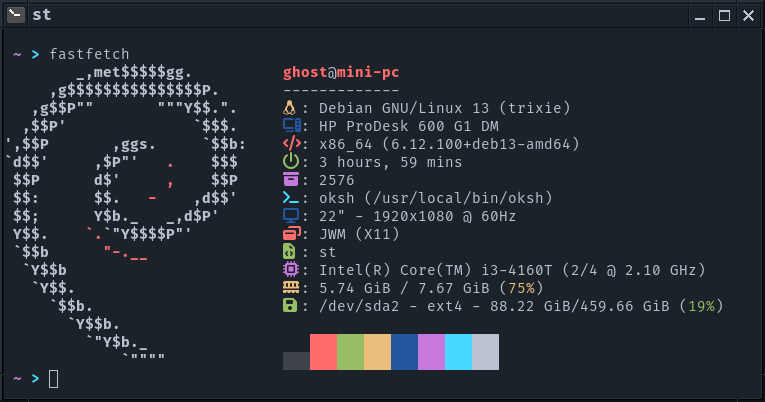
CPU: Intel i3-4160T (2 cores, 4 threads, 3.10 GHz)
RAM: 8GB (2x 4GB DDR3 SODIMM sticks)
GPU: Intel HD Graphics 4400 (according to intel.com)
SSD: 512GB Patriot P210 SSD
PSU: Included standalone power brick
General Info
The PC doesn't have inbuilt WiFi or bluetooth, but it does have slots inside for a WiFi/bluetooth card. There aren't any HDMI ports, but there are 2 DisplayPorts. I've been using a cheap adapter from Amazon to connect it to my HDMI monitor and have had 0 issues display wise.
There are 4 rear USB ports, 2 2.0 and 2 3.0. It also has
ethernet, although I haven't used it.
On the front there is a headphone port, and a headphone +
microphone combo port, plus 2 USB ports.
The 2 front USB ports are both USB 3, and work fine for
connecting my phone or my backup drive.
I'm running Linux on the PC, and all the tests here are done within Linux. Debian Trixie hasn't given me any problems, and I haven't had any graphics issues or crashes. The CPU is very old so I doubt a slightly more modern kernel would make a different, any issues are probably long since ironed out.
Performance
Video Playback
| Resolution | Format | Player | Performance | Notes |
|---|---|---|---|---|
| 1080p 60fps | h264 | mpv | No dropped frames | Using vaapi |
| 1080p 60fps (2x) | h264 | mpv | Some dropped frames | Using vaapi |
| 1080p 60fps | vp9 | mpv | No dropped frames | No hwdec |
| 1080p 60fps (2x) | vp9 | mpv | Lots of dropped frames | No hwdec |
| 1440p 60fps | vp9 | mpv | Bad performance | No hwdec |
| 1080p 60fps | vp9 | YouTube | No dropped frames | No hwdec |
| 1080p 60fps (2x) | vp9 | YouTube | No dropped frames | No hwdec |
| 1440p 60fps | vp9 | YouTube | Some dropped frames | No hwdec |
| 1440p 60fps (2x) | vp9 | YouTube | Very laggy | No hwdec |
Web Browser
I use Firefox, and have found the performance to be fine.
There is lag when opening a lot of tabs, or browsing
intensive pages (for example minecraft.net), and a small
amount of lag when switching between heavy tabs.
Minimal/lightweight websites like Wikipedia, the Factorio
Wiki or Arch Wiki work totally fine.
Amazon loads in about 1.5 seconds
Games
I tested GBA performance with 2 emulators, GPSP (via retroarch) and mGBA, with Castlevania Aria of Sorrow. In the intro, and beginning gameplay, both performed fine. The fast forward options got 10x+ speed on both.
Minecraft (26.2) ran okay, around 40 fps with all settings on low (fast graphics, fast clouds, no smooth lighting), 8 chunk render distance at 1080p. With Sodium and Lithium the fps increased to 50 fps, so it is playable.
Terraria was unplayable (in my experience Terraria is unplayable unless you can hit a rock solid 60 fps). It ran at about 40 fps and no matter which frame skip option I used it was running slow. Tested on low graphics at 1080p.
Power Consumption
| Doing What? | Power From Wall |
|---|---|
| Idle | 13W |
| Idle (Firefox open) | 15W |
| Playing music, video and Firefox open | 26W |
| 100% Load (stress -c 4) | 33W |
| Loading multiple tabs in Firefox | 40W |
| Compiling Retroarch core | 38W |
| GBA game | 22W |
| Minecraft | 55W |
| Terraria | 48W |
| Unigine Heaven | 43W |
Photo Stuff
Tested converting a 3280x2522 png image to 1920x1476, with
ImageMagick 7.1.1, 10 times
Command: time for x in $(seq 1 10); do magick in.png
-resize 1920x "out$x.png"; done
Took 18.16 seconds, with about 25% total CPU usage
Using Darktable to apply presets to photos works fine. It's not instant, but it also isn't instant on my more powerful laptop and desktop.
CPU/RAM
Geekbench 7: 898/1963: results link
Passmark: 1916/3476 (Memory: 1975): results link
GPU
glmark2: 619 (glmark2-es was the same)
Unigine Heaven (no AA, 1080p fullscreen, no tessellation): 6 fps (windowed was the same)
WebGL Aquarium (1080p, fullscreen, Firefox): 5,000 fish: 50-60 fps, 10,000 fish: 35-45 fps, 15,000 fish: 25-32 fps
SSD
This is probably more of a benchmark of the Patriot P210
512GB, but I ran kdiskmark anyway after running
fstrim -v /:
| Test | MB/s | us |
|---|---|---|
| Read: SEQ1M Q8T1 | 441 | 18,700 |
| Read: SEQ1M Q1T1 | 385 | 2,670 |
| Read: RND4K Q32T1 | 184 | 695 |
| Read: RND4K Q8T1 | 26 | 154 |
| Write: SEQ1M Q8T1 | 353 | 22,611 |
| Write: SEQ1M Q1T1 | 259 | 3,795 |
| Write: RND4K Q32T1 | 300 | 446 |
| Write: RND4K Q8T1 | 53 | 111 |
Temps
I forgot to log the temperatures when testing, so here's a selection of quick tests I ran:
| Test | CPU Temp ! |
|---|---|
| Idle | 42°C |
| Playing Video | 53°C |
| stress -c 4 | 70°C |
| Unigine Heaven | 62°C |
Connectivity
I had WiFI issues with my USB adapter, until I added:
[connection]
wifi.powersave = 2
as a config file at
/etc/NetworkManager/conf.d/no-wifi-powersave.conf.
Since then the WiFi has been fine, although it struggles to
get above 4 MB/s (for context my internet uplink is only 6
MB/s, so this wasn't a huge deal). Note I think this is the
fault of the TPLink USB WiFi adapter, not the PC.
Bluetooth has given me more issues, again probably because
I'm using a rubbish USB bluetooth adapter. It's a Mercusys
530, so I have to patch the module code with
dkms (GitHub
link).
Note the dkms install script doesn't work unless
you add kernel="${kernel%%+*}" after line 4.
After patching the btusb module, Bluetooth
works but I was experiencing a lot of disconnections/resets.
Putting the USB bluetooth adapter on the end of a USB
extension cable, and dropping it under my desk helped.
Upgrading the rtl8761bu_fw.bin blob with the
latest one from the Windows drive install package made a big
difference.
Right now my bluetooth keyboard works fine, on
average once every 3 hours it will cut out for a few seconds
and re-connect. If I'm using bluetooth earbuds with the PC,
or downloading a file using a lot of network bandwidth, the
frequency increases to about once every 30 minutes.
I don't blame the PC for any of this, it's a combination of a
cheap bluetooth keyboard, and a cheap small USB adapter.
Noise
The fan rattles a bit, only at specific RPMs seemingly. It's a minor annoyance which can be drowned out by even quiet music. Honestly based on the temperatures I saw, I could probably just run it without the fan and it would be fine. I might install a switch to toggle the fan at some point, just so I can turn it off when it's night time and everything's quiet.
It has a problem that a lot of electronics seem to, the fan is louder when it's on a solid surface, presumably because it reverberates through the material. Maybe it's just because I'm using a cheap hollow IKEA desk, but I had this issue with my PS4 slim as well. My current solution is to rest the PC on a jotter I had lying around, which seems to be sufficiently soft to dampen the vibrations.
I haven't noticed any coil whine except when plugging my phone into one of the front USB 3.0 ports. My guess is the phone draws a decent amount of current as it's trying to charge, and that activates some otherwise under-used power circuitry that causes the whine.
Maintenance
Opening the PC up is easy enough, there's just one thumb-drive screw on the back. You can access the SSD and the RAM (by removing the SSD). Getting the CPU fan and heatsink off is easy enough too. I gave the PC a clean when I first got it, although I haven't replaced the thermal paste yet, so it's still using the old stuff. I dropped the CPU when I first opened it, but it doesn't seem to have been damaged.
End Note
If you want me to test any other applications, or test a Windows install, or a different CPU etc, let me know and I can add on to the review! Hope this review is helpful, I would genuinely recommend this PC if you want a low power, main PC to use with Linux, especially for < £50. Would be good as a secondary PC to try Linux for a newbie too.